add custom secondary navigation on squarespace website 7.1 with custom html css and javascript/jquery by jishaansinghal
Get link
Facebook
X
Pinterest
Email
Other Apps
-
Add secondary navigation on Squarespace website 7.1 with custom HTML CSS and javascript/jquery by jishaansinghal. This code uses a CSS, Header Injection, and Footer editor and works with Squarespace 7.1
In this video, I'm showing you how to add custom secondary navigation on Squarespace website 7.1 with custom Code! You can change the background color which you wanted. This code uses CSS, Header Injection, and Footer editor Copy and paste the code below into the editor box. -------------------------------------------------------------------------------------------------------- //add custom secondary navigation on Squarespace website 7.1 //
Keywords: custom secondary nav, second nav, squarespace 7.1, text issues squarespace,how to fix text issues in squarespace,fixing the text in squarespace,squarespace text block,text block squarespace,squarespace text editor,squarespace,how to use Squarespace,squarespace tutorial,squarespace tutorial for beginners,how to use Squarespace 2018,how to add text squarespace,text spacing issue squarespace,Solopreneur Sidekick #squarespace #squarespacecss #howto #customizesquarespace #css #squarespacetricks #squarespacehacks #2021 #2020#2022,squarespacewebsitedesign,squarespace,css,jishaansinghal,designer,jquery,squarespacewebsite,customcss,design,announcementbar,squarespacewebsitedesigner,animated,html,fiverr,codecheatsheet
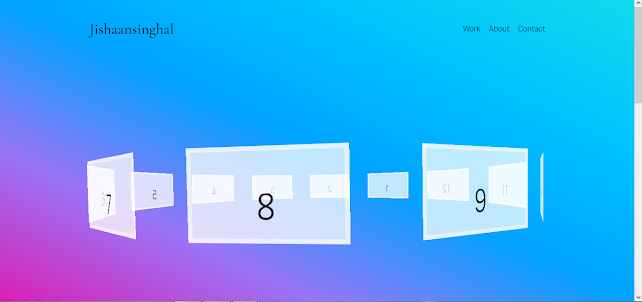
I'm going to show you how to add 3D Carousel on the Squarespace website with HTML CSS and JS code by jishaansinghal Paste this code in a Code Block: <div id="contentContainer" class="trans3d"> <section id="carouselContainer" class="trans3d"> <figure id="item1" class="carouselItem trans3d"><div class="carouselItemInner trans3d">1</div></figure> <figure id="item2" class="carouselItem trans3d"><div class="carouselItemInner trans3d">2</div></figure> <figure id="item3" class="carouselItem trans3d"><div class="carouselItemInner trans3d">3</div></figure> <figure id="item4" class="carouselItem trans3d"><div class="carouselItemInner trans3d">4</div></figure> <figure id="item5" class="caro...
In this video, I'm showing you how to add a button as a circle button on the Squarespace button with custom CSS Code! How To Install: Once a button has been added and saved, go to the Custom CSS Editor. Copy and paste the code below into the Custom CSS Editor box. This plugin uses a CSS editor and works with Squarespace 7.1, 7.0 to add an active effect on Button on Squarespace 7.1,7.0 by jishaansinghal. This code uses a CSS editor and works with Squarespace 7.1, 7.0 templates. This code uses CSS editor Copy and pastes the code below into the editor box. -------------------------------------------------------------------------------------------------------- // Circle Button Style o squarespace // .sqs-block-button-element--medium { padding : 100px 45px !important ; -webkit-border-radius : 50% !important ; -moz-border-radius : 50% !important ; border-radius : 50% !important ; } Customize: You do not need to change the transform or tra...


Comments
Post a Comment